
FAQs
Introduction
Do you have an introductory video I can watch?
Yes, here is a video that covers most of what is covered in this FAQ section: ' 👉 How to use BSVSearch.com to live, work and earn true Bitcoins anywhere, anytime
What is BSV Search?
BSV Search is where people find each other to transact in BSV (Bitcoin as originally designed, restored and implemented as Bitcoin Satoshi Vision) and where you can earn, sell and publish in BSV directly.
- Directory: find businesses and organisations that accept BSV, from restaurants and hotels to accountants, lawyers and builders, and list your own.
- Creations: sell your writing directly. Price an article in satoshis or give it away and accept tips. Gather articles into collections readers subscribe to, offer a subscription to everything you write, or sell a licence to reuse a piece. Readers pay your wallet straight from theirs; BSVSearch never holds the money.
- BSV Marketplace: offer things for BSV and arrange the deal directly with the other person.
- Items for Sale: furniture, clothing, appliances, tools and other goods, new or used.
- Vehicles: cars, vans and trucks, boats and canoes, bikes and scooters, and more.
- Property: homes, commercial property and land, for sale or for rent.
- Publications: books and ebooks, linked to where readers can buy them.
- Freelancing: offer your services, or post a job, project or gig.
- Web3 Sites: complete websites whose pages are inscribed on the BSV blockchain, browsed here under a short address such as bsvsearch.com/earthlog.web3.
- Sovereignty Tools: tools for moving around the BSV world on your own terms. Sovereign Keys creates your own keys and receiving addresses, Sovereign Pay prepares, signs and sends payments, and Sovereign Receiver shows a payment request and checks for incoming payments. Each is a single HTML file you can open here or download and keep. No account is needed, and your private keys stay on your device.
- Ordinals: register creations you have inscribed on the blockchain (images, music, video, text and more) so others can view, tip, buy or license them.
- BSV-Tipped Content: a leaderboard of videos, music, articles and other work, ranked by the BSV tips sent to it.
- Blog, Forum and FAQs: learn about the true Bitcoin (BSV, not BTC), its features, and the tools and apps around it.
In the Directory and the Marketplace you arrange each deal directly with the buyer, seller or service provider; you are in full control. Creations works differently: there BSVSearch shows the amounts, recognises the payment on the blockchain and opens access, though it still never holds the money.
BSV Search empowers you to use the power of Bitcoin Satoshi Vision — the coin, the network and the protocol — to live, work and earn a living in an ever-modernising world.
How much does it cost to post here?
Posting is free. Go ahead and post as much as you want. Registering an Ordinal that you have already inscribed elsewhere is free on BSV Search too.
Submitting a work for sale in Creations is free too.
How do I submit my own content?
You need to Create An Account.
After creating an account, you can make a submission to add your business, sell an item or offer it for rent by clicking here. To add an on-chain creation to the Ordinals directory, use "Register an Ordinal" in the Ordinals section; Web3 Sites are curated by BSV Search for now, with self-service publishing coming later.
Do you need to approve submissions first? How does the approval process work?
Before submissions are cleared for publication, we quickly run through the submission for apparent things like offensive or pornographic text and images and other indications that a submission is from a bot or a spammer. This means so long as you are making an honest effort to submit legitimate material, you can expect your submissions to be cleared for publication.
How do I find out about all the post from a particular user?
You need to be logged in to see a member's profile.
When you are viewing the profile of a user, click on Submissions to look at all the submissions they currently have.

When you click that, you will see a list of the Submissions from the user.

How do I find out when a submission has been posted and when it was last modified or updated?
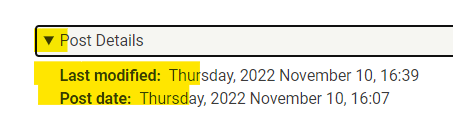
At the bottom of each submission is a Post Details section. This is where extra information about a post can be seen, such as its Last modified date and its Post date.
The Different Sections
Directory
This section is where you can search for a restaurant, an accountant, a plumber or any other business in your local area who are happy to accept BSV in search of their products or services. You can also search for organisations that are non-business entities, such as communities, websites, and forums that support BSV.
We are continually filling up our directory to ensure that people all over the world can find what they are looking for. If you have a business and you want to take advantage of the BSV payment system and attract business from BSV fans and supporters, we invite you to list your business here, without waiting for us to add it for you, because we are a small team and we are likely going to miss many business and organisations.
We encourage ALL businesses: from restaurants, hotels, hamburger places and pizzerias to services like those who provide trades services like electricians and builders. Professional services like development in blockchain, the web and the internet are encouraged, including traditional services like accountancy, law, bookkeeping, notary services, etc.
Organisations that are necessarily set up as a business (for-profit) entity. Community initiatives and other non-profits can and should list their organisations here.
Is your business or organisation already listed, and do you want to change its details? Open the listing's Contact Details tab and look at the Author. If it says BSVSearch, please contact us so we can hand the page over to you. You will need to create an account first, and we will need to verify that the email address of the account is in the domain name of the business or organisation.
Requests to delete a listing for an organisation must also come from an email address in its domain name, so we know the request comes from someone who represents it.
Creations
Creations is where writers sell their writing directly for BSV: articles priced in satoshis or free with tips, collections readers subscribe to, subscriptions to everything a writer publishes, and licences to reuse a piece. Readers pay the writer's wallet straight from theirs. Browse it under Creations in the menu (Articles, Collections, Writers), and see the Creations section further down this page for the details.
Items For Sale
If you have items, you no longer use that could be useful for other people, why keep them in your house, taking up precious space? Sell them here in exchange for BSV tokens instead.
What sort of items can you offer to sell here?
So long as it is legal to sell in your country, you may offer to sell them here. Most things found in households are ideal for listing here: including clothing, furniture, books, appliances and gadgets.
Vehicles
This section is where you can post an offer to sell any of the following vehicles:
- Cars, vans, trucks and motorcycles
- Bikes, eBikes, scooters and hoverboards
- Boats, yachts, canoes and kayaks
- Campervans and motorhomes
- Hang Gliders, balloons, jetpacks and snowmobiles
- Other vehicles
Property
In this section, you can offer any of your properties for sale or rent - whether it is Residential, Commercial, Industrial or Land.
All property types are welcome, including:
- Apartment
- Bungalow
- Cabin
- Cape Cod
- Colonial
- Condos
- Container Home
- Co-op
- Cottage
- Craftsman
- Duplex
- Farmhouse
- Flat
- Houseboat
- Mansion
- Manufactured Home
- Mediterranean
- Mid-Century Modern Style
- Mobile Home
- Ranch
- Semi-detached house
- Single-Family home
- Split Level
- Stand-alone house
- Studio
- Terraced House
- Tiny House
- Townhome
- Townhouse
- Tudor
- Unit
- Victorian
Publications
Publications is where authors and writers can sell their own books, or ebooks.
Freelancing
Freelancing is where you can offer your services in exchange for BSV, or post a job, project or gig for someone else to take on. You arrange the work and the payment directly with the other person.
Web3 Sites
Web3 Sites are complete websites whose pages are permanently inscribed on the BSV blockchain and browsed here under a short address such as bsvsearch.com/earthlog.web3. See the dedicated Web3 Sites section further down for the details.
Sovereignty Tools
Sovereignty Tools let you create your own BSV keys and addresses, send payments and request payments, each in a single HTML file you can use here or download and keep. Find them at bsvsearch.com/sovereigntytools.web3 (also listed under Web3 Sites), and see the Sovereignty Tools section further down this page.
Ordinals
The Ordinals directory is where you register your own on-chain creations — images, music, video, interactive pages, text and more — so others can discover them and tip, buy or license them in BSV. See the dedicated Ordinals section further down for the details.
BSV-Tipped Content
BSV-Tipped Content is a leaderboard of videos, music, articles and other work, ranked by the BSV tips sent to it. Each work has its own BSV address, and tips go straight to the creator. See the BSV-Tipped Content section further down this page.
Events
In this section, you can promote any event your business, employer, local government, or you organised. It could be a corporate event, a government event or a street party!
Making a Submission
Steps to making a submission
1. At the end of drafting your submission on any of the submission pages here, you choose Save As: 'Admin to Review' to send your submission for one of the site administrators to check.
2. After your submission is checked, the site administrator could label it as 'Author to Update' to send it back to you for further edits or Clear for publication.
A submission could be placed under 'Author to Update' status for reasons like a post containing images with nudity, anything disturbing or offensive, and other such issues.
The reason will be specified on your Submitted Content page (My Account>Submissions).
3. If your submission is Cleared for publication, it will be published on the website.
Tips in Drafting a Submission
- Provide a good description, information about the subject of your post because they are used by the website to search for submissions relevant to what a website user is looking for. Use words specific to that product, item or industry: words that you think people will use to search and find your page.
What are "Current state" and "Change to" at the bottom of my submission's edit form?
They show where your submission is in the review process and let you move it on.
Current state is where it is now, for example Admin to Review. If you have sent it for review and want to keep working on it, open it to edit, set Change to to Author to Update and press Save. When you are ready, set Change to back to Admin to Review and save again.

Revision log message, just above, is where you can leave a short note for the administrators, for example what you changed.
I see one of my Submissions in Author to Update what does this mean?
When you go to My Account > Submissions, you might see something like this:

In the above example, we see that the admin has placed a note saying that the post has offensive images, and this is why the submission is still under Author to Update status, and it is not Published (x) yet. This means that the Author needs to open the document again and correct for whatever issues were mentioned on the page above. Once these issues had been corrected for, the Author should change the Moderation State back to Admin to Review.
How long does it normally take for a submission to be approved?
We endeavour to review all submissions within 24-48 hours.
Can I still edit my document while it is in Admin to Review status?
Yes you still can. You can access your submitted content in My Account > Submissions. From there, you can click to edit your submissions.
How can I tell if my submission has been approved?
You can tell in three ways:
1) We email you "Your content has been cleared on BSVSearch.com".
2) You can see it on the website, listed under the appropriate section.
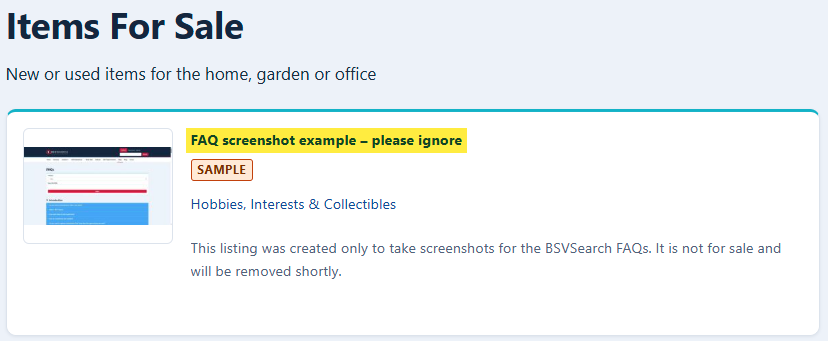
3) Go to My Account > Submissions and look for Cleared in the Moderation state column and a check mark under Published.

Important Items to Understand
BSV Search does not represent any of the Sellers or Buyers on the website
BSV Search provides a website where offers are made to sell or buy but it is important for website users and visitors to know the following:
- We do not verify, certify or claim to know any of the participants here. This is why we encourage people to visit the website provided about each post or have a conversation with the person making the offer to find out what you can before deciding to transact with them.
- Outside Creations, we do not facilitate the transaction or payments between participants here. It is up to you to make arrangements with each of the individuals with whom you do business.
Creations works differently. When you buy access to a work there, BSVSearch shows you the exact amounts and addresses, recognises your payment on the blockchain, opens your access, and takes a platform fee. It still never holds anybody's money: your wallet pays the writer's wallet directly. See the Creations section of these FAQs.
Trust and Identity
People would likely be more comfortable dealing with people they know a little about. Make the most of the space provided for you to write as much information as possible to others considering doing business with you. It is up to you to decide how much information you wish to provide but if you have a website, an email address or a phone number , consider if you should share them to make it easier for other users to contact you.
Items and activities not allowed
The concept is, if it is illegal for you to sell, or offer for rent or otherwise, then please do not post it on BSV Search. Obvious items include illegal drugs, weapons and all those things not considered savoury by most people, and by the law. If you are not sure, please check the laws that apply to you.
Transacting Online and with BSV Search
Tips on transacting online and with BSV Search
BSV Search provides offers from people and businesses who submit them to this website. We do not certify or verify who they are. Outside Creations, we are not involved in whatever transactions may take place between two people about the items posted here. We encourage people to take basic precautions when dealing with people they do not know, some of which are mentioned below:
- When you need to meet with people to exchange goods and transfer payments, meet with people in a public area or, if possible, near a police station.
- Before you buy from someone, check out their profile (you need to be logged in to see member profiles) so you know the person making the offer before you decide to transact with them. The scrutiny you apply depends on what they are offering. You might care less if you are buying a box of old books than if you were buying a car or a motorcycle, where the government establishes a process on how such sales are to take place.
- Transacting in BSV is no different from agreeing to exchange one thing for another (unless under dictatorships and authoritarian regimes explicitly prohibiting the use of Bitcoin and cryptocurrencies). You can write contracts and agreements.
- Therefore, when practical - like in cases of sales of expensive items - write an agreement. This agreement should provide details of both parties, including their names and addresses, to evidence that a transaction is taking place. Emails and communications of this are useful in proving details of the intentions of the people transacting.
- Having a contract/agreement evidenced by signatures, and third parties, including notaries when appropriate, are helpful if one party needs to assert their rights because the other person did not fulfil their side of the bargain.
Asking Questions about a Post and Reviewing a Business
How do I ask a question about a post?
If you have questions about a post, you can ask it privately (if you do not want your question and your conversation to be seen by others) or publicly (if you are happy for your question and conversation to be seen by other users of the website).
You need to be logged in for either option: member profiles, the Contact form and the Questions and Comments box are open only to logged-in members.
Option 1: Privately
Within the description of a post, open the Contact Details tab and look for the Author's username.

Click the name which leads you to the author's user profile:

Click on Contact, fill out the Contact Form and send. 
The message is sent to the author's email address so they can email you back.
Option 2: Publicly
This is useful if you think that other users interested in the product might also benefit from knowing the answer to your question and you do not mind sharing the conversation for the rest to see on the website.
To ask your question publicly, expand the Questions and Comments at the bottom of the submission/post. Type your question, choose whether you want to be notified when there's a reply to your comment or any comment made on the same post.

How do I provide a Feedback to, or Review of, a Business?
You need to be logged in to write a review.
At the bottom of a business page, expand the Review/Feedback section. Give your review a Subject, choose a Star Rating out of 5 (5 is the most favourable, 1 the least), write Your Review of this Business, then Save.

Other users and the business you are reviewing may reply to your review, so they have the chance to respond to the feedback they receive.
'Sample' and 'Live' Content
While we are waiting for more people like you to get involved and start using and adopting BSV in your daily lives, work and business, we post sample content for demonstration purposes. Eventually, live content will drown out the sample content after which we will slowly deactivate the sample content.
To find out whether a listing is sample or live content, open it and look under Post Details: the Listing status line says Live or Sample.
On the section pages (such as Vehicles, Items for Sale or the Directory) you can show only live listings with the filter at the top: choose Live under Listing status.
BSV-TIPPED CONTENT
Guidelines with BSV-Tipped Content
- Each content should have its own unique BSV address. Meaning, you should not assign a BSV address to other content.
- Only use content that you created, or that you have a legal right to use, to avoid copyright disputes in the future.
What is BSV-tipped content?
BSV-tipped content is a creative or informative work that people can support by sending Bitcoin SV (BSV) tips to a public BSV address assigned to that work. Examples include videos, music, articles, illustrations, photographs, performances and other original creations.
Articles published in Creations on BSV Search can receive tips too, but that works differently: see the Tips section under Creations.
Copyright Issues when using other people's songs or music and asking for tips
Performing a song in a public forum where you are not asking for tips could be considered a fair use of the song, and you would not need permission from the copyright holder. However, if you perform a famous song online, record it, and publish it online, and ask people to send you tips, you may be infringing on the copyright of the song's owner, which could result in damages, attorney's fees, and even criminal charges.
Here are some specific reasons why your actions could be considered copyright infringement:
- You are creating a derivative work of the song. When you record a cover of a song, you are creating a derivative work of the original song. This is a copyright-protected work, and you need permission from the copyright holder to create a derivative work.
- You are distributing the song without permission. When you post your recording of the song on YouTube, you are distributing the song to a large audience. This is a copyright-protected act, and you need permission from the copyright holder to distribute the song.
- You are asking for tips in exchange for the song. Even if you are not charging for the song directly, you are asking for tips in exchange for it. This could be considered a form of payment, and you may need permission from the copyright holder to accept payment for the song.
To avoid copyright infringement, you could:
- Obtain a license from the copyright holder. This would give you the legal right to perform, record, and distribute the song.
- Create your own original work. This would avoid the need to obtain permission from the copyright holder.
It would be advisable to consult with an attorney to get legal advice on how to use copyrighted material, such as songs.
What do I need before adding my content?
Your content should already be published and accessible online. Assign it a unique BSV receiving address that you control, and make sure you created the content or have the legal right to publish and monetise it. You can then submit it for inclusion on the BSV-Tipped Content leaderboard.
Does my content have to be hosted on BSV Search?
No. To the contrary, BSV-Tipped Content is designed more for content not published on BSVSearch.com. These could be content from your website, or your Social Media Networks accounts like YouTube, X, and so on.
Why must each work have its own BSV address?
A unique address allows BSV Search to associate the tips received at that address with one specific work and display its tipping activity accurately. Do not reuse the same address for several works, because it would not be clear which work a tip was intended to support.
How can I obtain a BSV receiving address?
Create a public receiving address using a wallet that supports Bitcoin SV. Make sure you control the wallet and can access funds sent to it. Only provide the public receiving address. Never provide BSV Search or anyone else with your wallet password, private key, recovery phrase or seed phrase.
You can use Sovereign Keys to create receiving addresses and their private keys on your own device. Back up each private key before you share the address, because only that key can spend what it receives.
Does my content need to cite its official BSV Tipping Address?
There is a risk that anyone could post other people’s content here and ask for tips. Therefore, the content or the author must cite the official BSV tipping address for that work. Ideally, the work itself must include the BSV tipping address whenever possible. For example, if it is a video or a PDF, the video should display the QR code or BSV address on screen, and the PDF should include it in an appropriate place. This allows us to quickly verify that the tips will go to the rightful creator/owner.
Does my content need to have received a tip already?
No. You may add your content once it is published online and has its own unique BSV receiving address. Its tipping figures will update as supporters send BSV tips to that address.
Is there a minimum amount that someone must tip?
BSV Search does not specify a minimum tip. Supporters may send a small number of satoshis or a larger amount of BSV. The amount should be chosen freely by the person supporting the content.
How does the BSV-Tipped Content leaderboard work?
The leaderboard displays tipping activity associated with the unique BSV address assigned to each work. Total satoshis tipped determines the primary ordering, followed by number of times an address has been tipped.
Does BSV Search collect or hold my tips?
No. This is why you need to provide a BSV Address to which you have the private keys. People who tip you, tip you directly there using their own wallet. Their tip goes direct from them to you. BSV Search scans the BSV Blockchain to display your BSV tipping wallet's activity. Please note you are responsible for safe-keeping your privatey keys.
Is it free to submit BSV-tipped content?
Yes. BSV Search currently allows users to create accounts and make submissions free of charge.
Do I need a BSV Search account?
Yes. You need to create an account and log in before making a submission. Your account also allows you to review and update your submitted content.
What information should I include in my submission?
Provide the title of the work, the creator or performer's name, a clear description, the type of content, a working link to the published work, and the unique public BSV receiving address assigned to it. Include a suitable image or thumbnail where applicable, and check every link and address carefully before submitting.
Will my submission appear immediately?
Submissions may be reviewed before publication. BSV Search aims to review submissions within 24 to 48 hours. An administrator may publish the submission or return it to you with a request for changes. You can check its status under My Account and Submissions.
Can I submit content created by someone else?
Only submit content that you created or have the legal right to publish and monetise. Covers, remixes, adaptations and works containing material owned by someone else may require permission or a licence. Owning a copy does not necessarily give you the right to publish it or receive tips from it. Seek appropriate legal advice if you are uncertain.
What happens if my content link stops working?
Update your submission with a working link as soon as possible. Content that cannot be accessed or verified may be removed from the leaderboard until the problem is corrected.
What if I enter the wrong BSV address?
Check the address carefully before submitting. A tip sent to an incorrect address is irreversible. That is the nature of Blockchain. If you discover an error, update the submission immediately.
Does appearing on the leaderboard guarantee that I will receive tips?
The objective of the leaderboard is to provide visibility to works of people who wish to receive BSV tips. But it cannot and does not guarantee future tips, income, promotion or any particular ranking. Creators remain responsible for sharing and promoting their work.
Ordinals
What is an Ordinal?
An Ordinal (a "1Sat Ordinal") is a piece of content — an image, an audio file, a video, a web page, text, or another file — that has been permanently inscribed onto the BSV blockchain. Because it lives on-chain, it can never be altered or deleted, and it carries its own provenance: who created it and when. The catch is that nobody can easily browse Ordinals unless a website surfaces them — which is exactly what the Ordinals directory on BSV Search does.
What is the Ordinals directory on BSV Search?
It is a place where you can register your own Ordinals so other people can discover them, enjoy them, and support you. Each registered Ordinal gets its own page that shows the content itself, its on-chain details (creator, size, collection), and any ways the creator has chosen to be supported — tips, purchase, or licensing. You can browse everything in the directory and filter by media type, collection, categories and tags.
How do I register my own Ordinal?
You register an Ordinal by its transaction ID (TXID) — the on-chain address of the inscription. Start a new Ordinal submission, paste in the TXID, and BSV Search automatically fetches the content, detects what type of media it is, and shows you a live preview so you can confirm it is the right one before you submit. You then add a title, choose categories and tags, and submit it for review like any other content on the site.
What is a TXID and where do I find it?
A TXID (transaction ID) is the 64-character code that identifies the transaction in which your content was inscribed on-chain. It can optionally be followed by an output index, for example _0. You will find it in the wallet or service you used to inscribe your Ordinal (for example, your inscription receipt or transaction history). Paste it in exactly as it appears — BSV Search will tidy up the formatting for you.
What types of media can I register?
Images, audio, video, interactive (HTML) pages, plain text, and other file types are all supported. You do not need to tell us the type — BSV Search detects it automatically from the inscription and renders it the right way (an image is shown as a picture, audio and video get players, an interactive page is shown safely, and so on).
Do you store my Ordinal's file? Where does the content come from?
BSV Search fetches the content from the chain on demand whenever someone views it. We 'cache' the files on our servers to help reduce the load on BSV Indexers, so they do not have to serve the files every request.
How do tips, purchases and licensing work?
These are display-only — BSV Search shows the relevant BSV address (with a QR code) so a supporter can pay you directly, peer-to-peer. For Ordinals there is no middleman, no escrow and no fee taken by BSV Search. Amounts and prices are shown in BSV only. "Tips" are a no-strings thank-you; "Purchase" is for personal use; and "Licensing" is for commercial use. Each shows only when the creator has inscribed a BSV Tipping Address on the metadata of their Ordinal upon inscription.
There are many places where you can inscribe ordinals. The one we use is 3DOrdi.io. You create a 'Collection', and then add a 'Trait' with a label that has the words Tip/Tipping/Tips, Buy/Purchas/Licens, maybe the word 'Address' or 'BSV' then followed by a valid BSV Address. If we are able to detect these Addresses, then we will use them here for that purpose.
We do not use the Inscriber's BSV Address that paid for the inscribing because the funds they have there could be for many reasons, not a specific reason like tipping, licensing or buying. We also do not tip BSV address on which the ordinal is burnt to avoid risking destroying those ordinals.
Why can't I type in my own tip, buy or licensing address?
To protect creators. Because anyone could register someone else's Ordinal by its public TXID, allowing free-typed payment addresses would let a stranger redirect your tips and sales to themselves. So BSV Search only ever uses payment addresses that are inscribed in the Ordinal itself, on-chain. If an Ordinal has no inscribed payment address for an offering, that offering simply isn't shown — money can only ever reach an address the creator committed to on-chain.
What do the "tips" figures on the cards mean?
For Ordinals that have a dedicated tip address inscribed on-chain, BSV Search adds up the total amount tipped to that address and the number of tips, and shows it as a simple appreciation signal (for example, "♥ 0.0003 BSV · 3 tips"). These figures are refreshed roughly once a week, so they may lag the very latest activity by a few days.
What is a "Terms of Use" record, and why would I use one?
When you let people purchase or license your work, they need to know the terms. Rather than retyping your terms on every listing, you create a reusable Terms record — a short entry with a label (e.g. "Music Terms") that points to the on-chain document holding your current terms of use. You then attach that record to your Ordinal's purchase or licensing offering. The big advantage: if you ever update your terms, you change the record once and every Ordinal that points to it updates automatically.
How do I create and manage my Terms records?
You manage your own Terms records from the "My Terms records" page (also linked as a "+ Add new Terms record" option right on the Ordinal submission form). Give the record a label and paste the TXID of the on-chain document that holds your terms — you'll see a live preview of that document so you can confirm it's correct. Each person manages their own records, just like categories.
Why isn't my Purchase or Licensing offering showing on my listing?
Two things are needed for a Purchase or Licensing offering to appear: an inscribed payment address for it (see the question about typing your own address), and a Terms record attached to it. Purchase and Licensing are only shown when a Terms record is attached — this makes sure buyers and licensees always have terms to read. Tips are different: they show whenever a tip address exists, and a Terms record is optional.
Can I set default terms so I don't have to choose them every time?
Yes. On your account profile you can set a Default Terms record. When you register a new Ordinal, its tip, purchase and licensing terms are pre-filled with your default, so a single document that covers everything needs no extra step. You can always override or clear it on any individual Ordinal.
How do my buyers know which terms applied when they bought?
Every listing shows a "View terms" link that opens your current terms document. Because both the payment and the terms live on-chain with dates, the version of your terms that was in effect at the time of a payment is always provable — updating your current terms later never changes agreements that were already made.
Do Ordinal submissions need to be approved?
Yes — Ordinals go through the same review process as other submissions on BSV Search (new → Admin to Review → Cleared → Published). You can register your Ordinal, see a preview, and submit it; it becomes publicly visible once it has been reviewed. See the "Making a Submission" section above for how the moderation states work.
Can I register an Ordinal I didn't create?
Please only register content you created or have a legal right to use, and the same copyright care described in the "BSV-Tipped Content" section applies here. Remember that payment addresses come only from what is inscribed on-chain, so funds always go to the parties committed in the inscription — but you should still not list work that isn't yours to offer.
Can I edit or remove my Ordinal listing later?
Yes. You can edit your Ordinal's title, categories, tags and attached Terms records at any time from your listing, and you can unpublish or delete it. The on-chain content itself is permanent and stays on the blockchain regardless — editing the listing only changes how it appears in the BSV Search directory.
Web3 Sites
What is a Web3 Site?
A Web3 Site is a complete website whose individual pages have each been permanently inscribed onto the BSV blockchain as Ordinals. Instead of living on a web server, every page is stored on-chain — so it is timestamped, carries its own provenance, and cannot be quietly altered or taken down. BSV Search caches these files, and services them to site users here on BSVSearch.com.
What is the Web3 Sites directory on BSV Search?
It is a browsable index of the Web3 Sites we have published, at bsvsearch.com/web3sites. You can search by keyword and filter by category or tag, then open any site and read it right here on BSV Search — no wallet, plug-in or special browser required. It is the counterpart to the Ordinals directory, but for whole websites rather than single inscriptions.
How is a Web3 Site different from an ordinary website?
An ordinary website lives on rented hosting under a DNS domain; if the bill goes unpaid or the host shuts down, the site vanishes — a great deal of the early web has been lost this way. A Web3 Site's pages live on the blockchain instead, so they persist independently of any single company. BSV Search simply reads those on-chain pages and presents them to you as a website.
How do I visit a Web3 Site?
Open the Web3 Sites directory, choose a site, and it opens on BSV Search at its short address — for example, bsvsearch.com/earthlog.web3. From there you can click through its pages just like any other website. Each page you see came from its inscription on the blockchain.
Where are the pages stored — does BSV Search host them?
The pages, along with their images, audio and other files, are stored on the BSV blockchain. BSV Search fetches that on-chain content, caches it so it loads quickly, and serves it to you. We are the window onto the content, not its permanent home — the blockchain is.
Can a Web3 Site be changed or taken down once it's published?
The inscribed pages themselves are permanent and cannot be edited or deleted — that is the whole point. What the author can do is publish a new version of a page and point the site's address at the new inscription. The earlier version still exists on-chain; the site simply displays the latest one.
How does an author update a page?
They re-inscribe the page as a new Ordinal and re-point that page's address to the new inscription. Links between the pages keep working, so a single page can be refreshed without rebuilding the whole site. Nothing is overwritten — the previous inscription remains on the chain as a permanent record.
Can I get my own Web3 Site? What do I need to publish a Web3 Site?
Each page of your site is first inscribed on-chain as an Ordinal, which gives it a transaction ID (TXID). A Web3 Site is then simply a name plus a small map that links each page to its TXID. The pages themselves are ordinary, self-contained HTML files, so building one takes the same skills as building any simple website — the only difference is that the pages live on the blockchain rather than on a server.
We've also made a video that walks through the whole process: "Web3 Websites for Photographers, Artists and Musicians: Prove Authorship, License Your Work, Get Paid" (https://youtu.be/BSecAAF4QlI).
At the moment, Web3 sites on the BSV blockchain are viewed through https://browser.ordnet.io/ (Web3 domains can be bought at https://domains.ordnet.io/). BSV Search also displays a number of Web3 sites directly in its Web3 Sites directory, such as Earth Log, Marquez, Thank You and Sovereignty Tools. Letting site owners register their own sites here is planned for a later release. Making these sites viewable in more than one place adds real resilience: your site, and everyone else's, stays findable and browsable even if any single browser goes away.
Can visitors support or tip a Web3 Site?
Not yet, but it's on the way. We plan to support tipping for Web3 sites the same way we already do for Ordinals. Once it's live, BSV Search will read your site's home page (index.html) inscription and look for a field specifically marked as a tipping address — for example, one labelled "BSV Tipping Address". If it finds one, a tip option will appear so visitors can send the author a tip directly; if a site doesn't show one, the author simply hasn't set it.
How is a Web3 Site related to Ordinals?
They are built from the same foundation. Every page of a Web3 Site is an Ordinal — an on-chain inscription — so a Web3 Site is really a collection of Ordinals (the pages, plus their images, audio and other files) tied together under one name and presented as a browsable website. If you understand the Ordinals directory, Web3 Sites are the next step up: whole sites rather than single pieces. Web3 Sites provide you an opportunity to present your individual ordinals in a way that you want them presented.
What happens to my Web3 Site if BSV Search disappears?
Because every page lives on the BSV blockchain, the content itself does not depend on BSV Search to survive — the inscriptions remain on-chain permanently. BSV Search provides a convenient way to browse and read them, but the underlying pages would still exist and could be served by any tool that can read the chain.
Getting Started
What do the technical terms used in Sovereignty Tools mean?
This glossary explains how we use technical terms in Sovereignty Tools. The terms remain in the tools and FAQs so you can recognise them when following instructions.
Your device and online services
Local / locally: Something happens on your device. For example, Sovereign Pay uses your private key on your device to sign a transaction. Local does not necessarily mean disconnected from the internet.
Remote / remotely: Something happens on another computer, reached through a network. A remote service might be an online explorer that your device contacts to check a payment.
Offline / online: Offline means disconnected from the internet; online means connected. Signing can happen on an offline device, but sending the signed transaction to the BSV network requires an internet connection.
Browser storage: Information a website or application saves in the browser you are using so it can remember it later. Clearing the site's browser data can remove it. Receiver uses this for payment-request details and preferences, not private keys.
Network request: Information your device sends to a service and the response it asks for—for example, asking an explorer about a public address or transaction.
Keys and control
Address: A public destination used to receive BSV. You can share a receiving address; it is different from the private key that authorises spending.
Private key: Secret information used to authorise spending. Anyone who obtains a usable private key may be able to spend the funds it controls.
WIF (Wallet Import Format): A text representation of a private key. A WIF is a secret, not a receiving address.
Self-custody: You control the private keys and are responsible for keeping them and their backups safe. Sovereignty Tools does not hold the keys for you or recover lost secrets.
Payments and their status
UTXO (unspent transaction output) / coin: A particular amount of BSV left available by an earlier transaction. One address can hold several UTXOs. Here, a coin does not mean one whole BSV. When a UTXO is used, it is spent in full and the transaction creates new outputs.
Eligible / spendable coins: Coins that meet the tool's requirements for inclusion in a payment. A displayed balance can include funds that the tool cannot currently use, such as pending or excluded outputs.
Change / change output: Funds left over from the coins used in a payment, after the recipient payments and fees. A change output sends that remainder to the chosen change address. Coins not used in the payment stay where they are, so change may differ from your total remaining balance.
Signing / digital signature: Using a private key to produce mathematical proof authorising the transaction. Signing does not itself send the transaction to the network and does not put the private key inside the transaction.
Broadcasting / submission: Sending the signed transaction to the BSV network, usually through an online service. A service accepting it is not the same as confirmation.
Pending / unconfirmed: A transaction has not yet been included in a block. Its status may still change.
Confirmation: The transaction has been included in a block on the blockchain. Further blocks added after that block increase its confirmation count.
TXID (transaction ID): The identifier used to look up a transaction and check its details or status. It identifies the transaction, not the person who paid.
Explorer: A service for looking up blockchain addresses, transactions and blocks. It can help you check a payment's details and confirmation status.
Satoshi / sat: The smallest unit of BSV. One BSV equals 100,000,000 satoshis.
Network fee / tool fee: The network fee pays for processing the transaction. A tool fee is a separate charge made by the application, where applicable. Review both in the payment preview.
Files and the blockchain
Inscription / inscribed file: File data recorded in a blockchain transaction. Updating a website's link to a newer inscription does not change the earlier inscribed file.
On-chain: Recorded in the blockchain. A note deliberately included on-chain may be public and permanent.
SHA-256 / file fingerprint: A value calculated from a file's exact contents. Compare it with the published fingerprint for the same file and version to check that your copy matches. A match establishes file identity; it does not establish that the software has no defects.
HTML file: A file a browser can display and run. The Sovereignty Tools applications include their required application code in their HTML files, allowing you to keep downloaded copies.
What is Sovereignty Tools?
Sovereignty Tools helps you create BSV keys, send BSV and request payments using keys and addresses you control. Its three tools are Sovereign Keys, Sovereign Pay and Sovereign Receiver. You can open them in your browser or download their HTML files to keep.
Which tool should I choose?
- Sovereign Keys: create or inspect keys and receiving addresses.
- Sovereign Pay: prepare, review, sign and send a payment.
- Sovereign Receiver: show someone a payment request and check for incoming payments.
Start with the recommended downloads on the Sovereignty Tools page. Use its Releases link for earlier editions and their documentation.
Do I need an account, an installation or a custodial wallet?
No account or software installation is required. The tools run as HTML files in a modern browser.
Sovereignty Tools does not take custody of your funds. You remain responsible for the private keys and recovery information that control them. Sovereign Pay can use independent network services when you deliberately ask it to find confirmed spendable coins or send an already-signed transaction, but it does not require you to transfer your funds into an account controlled by the tool.
Sovereign Keys
What can I do with Sovereign Keys?
You can create a single address and private key, printable paper wallets or a batch of keys. Advanced functions include recovery-phrase wallets, encrypted keys, vanity addresses, splitting a secret into recovery shares and inspecting existing key material.
Begin with a single wallet if you are learning. Back up the private key before receiving funds. For advanced functions, follow the instructions for your version and test recovery before relying on the backup.
Does Sovereign Keys connect to the internet or save my keys in browser storage?
The released Sovereign Keys 1.0 application is designed to make no application network calls and no browser-storage calls. It can be downloaded and used on an offline device.
That does not make every device safe. Malware, screen capture, a compromised browser, insecure printing, cloud-synced folders or physical access to the device can still expose a secret. Use a device and environment appropriate to the value you plan to protect.
What is the safest way to begin using Sovereign Keys?
Begin with a new key on a trusted device, preferably offline. Create and check the backup material you will need, and make sure you can identify the public address separately from the private key or recovery phrase before adding funds.
Do not place a real private key, WIF, seed, mnemonic, recovery phrase, wallet backup or passphrase in a screenshot, cloud note, chat message, forum post or support request. For a first experiment, use only a very small amount that you can afford to lose.
Can Sovereignty Tools recover a lost private key or recovery phrase?
No. Sovereignty Tools does not keep an account or a recovery copy of your secrets. If the only private key, recovery phrase or required backup is lost, the tool cannot restore access to the funds.
Make backups suitable for the key method you choose, store them securely, and test your understanding before funding the address. Never send recovery material (keys, passphrases, passwords) to somebody who offers to “check” or “restore” it for you. There's plenty on Social Networks.
Sovereign Pay & Editions
What does Sovereign Pay do?
Sovereign Pay builds and signs BSV payments on your device using compatible private keys you control. You review the payment details and fees before sending the signed transaction to the network.
From Pay 2.0 onwards, the application automatically chooses confirmed spendable coins sufficient for the payment and fees. Other coins remain untouched. You do not need to choose the individual coins yourself.
Will Sovereign Pay work with every BSV wallet or key format?
No universal compatibility is claimed. Sovereign Pay is designed for compatible BSV addresses, transaction data and private keys in WIF format. Other wallets may hide their keys, use a different signing method or provide data in a format Sovereign Pay does not accept.
Do not export or expose a wallet secret merely to make it fit a tool you do not yet understand. Test with a new key and a very small amount.
Does scanning a QR code mean I can trust its contents?
No. A QR code is a way to transport data, not proof of who created it or whether it is safe. Sovereign Pay validates supported data and shows important details for review, but you must still check the destination, amount, note and other transaction details.
A checksum can help detect damaged or incomplete data. It does not authenticate the sender. Private-key QR codes are especially sensitive because cameras, screens, image files or a compromised device may expose the key. Never scan a private-key QR merely because somebody asks you to.
Portability, Downloading & Offline Use
Are the applications really just HTML files?
Yes. Each released application is a self-contained HTML file with its required code and libraries included. You can save it, transport it, back it up and open it in a modern browser without a conventional installation.
Portability does not prove that every copy is genuine. If the file came from another person, email, chat, USB drive, cloud storage or another website, compare its SHA-256 digital fingerprint with the value on the official Sovereignty Tools page before entering a secret or using funds. Or to be sure, you can re-download the file/s here. You can just download the HTML file of the tool you want to use. You can also take note of TXIDs of the files so if ever BSVSearch.com stops, you can always download the files from the BSV Blockchain.
Can I use Sovereignty Tools offline?
Yes, for the local parts of the process. Keys can generate keys offline, Pay can sign offline using prepared transaction information, and Receiver can create a payment QR offline. Looking up funds, sending transactions and checking incoming payments require internet access.
Can I sign a Sovereign Pay transaction on a separate offline device?
Yes. Sovereign Pay supports a process in which transaction information is prepared on one device and signing takes place on a separate offline device. Sovereign Pay QR Editions (1.2 and later) support QR codes for key-free offline signing packages and for returning a signed transaction to the connected device.
Compare the transaction details on both devices. Move signing packages only between devices you control; do not post them publicly or send them to another person. A package checksum helps detect transport errors but does not prove who created the package.
What can I do if live camera QR code scanning is unavailable?
When you open an HTML file stored on your phone (locally), most browsers — including Chrome, Edge and Firefox — block the live QR camera. The app itself still works for anything that doesn't need the camera. This is a browser or device restriction and does not mean the application is broken. Below are your alternatives.
(1) Use an app that serves the file to your browser. You can tell the camera will not work when the browser's URL bar begins with content:// — the file was handed to the browser through a restricted channel for which browsers do not grant camera access. It will normally work when the URL bar begins with http://127.0.0.1:, which means the file is being served to the browser by your own phone. Chrome and Edge do not seem to allow access to read QR codes when loading a HTML file from your own device.Other explorers like Samsung Explorer and Firefox, as well as other apps like CX File Explorer worked. With such apps, you can open local HTML files with it and allows the QR Code function. On an iPhone, look for a file manager or local web-server app that can do the same. Please let us know if you find apps that open these files without interrupting the QR code function.
(2) Use the "image-decoding" option. Load a saved image of the QR code instead of scanning live. Avoid this method for private-key QR codes if your photos are often backed up to the cloud automatically — and delete any QR image as soon as you no longer need it.
(3) Open the file on a desktop or laptop. Computer browsers trust files opened directly from disk: double-click the file (or drag it into the browser window) and the camera permission prompt appears as normal.
(4) Run the tools straight from BSVSearch.com.
Can I modify or redistribute an application file?
The source is visible, but the project licence and attribution still apply. The permitted customization is limited; consult the licence inside the exact application before changing or redistributing it.
Any modification creates a different file with a different SHA-256 value. Treat it as a separately testable version, not as the official Sovereignty Tools release. Do not remove warnings or attribution, rename the products for white-label distribution, or alter or redirect the Sovereign Pay tool fee.
Self-Custody, WIF Handling & Confirmation
Should I use a fresh address and private key each time?
A fresh address can help separate activity, but it does not automatically make a payment private or protect a compromised device. Keep the backup for every address that still controls funds.
By default, choosing a fresh change address moves only the change from the coins used in that payment. Coins Pay did not select remain at their original addresses.
From Pay 2.1 onwards, you can select Move all remaining spendable funds to this change address to include all eligible coins loaded from your source addresses. After paying the recipients and fees, the remainder goes to the change address. Pending or excluded funds are not moved. Keep your old private keys until you have checked for remaining funds and pending incoming payments.
If you want to retire an address, use the appropriate sweep workflow and check afterwards for remaining funds and later incoming payments.
What does self-custody mean here?
Self-custody means that you, rather than Sovereignty Tools, control the private keys that authorize spending. The application does not hold an account balance for you and cannot freeze, recover or reverse your funds.
The benefit is direct control and portability. The responsibility is that a leaked secret, missing backup, wrong destination or misunderstood transaction can lead to permanent loss. Use security measures proportionate to the value involved.
What is a WIF?
WIF stands for Wallet Import Format. It is a text form of a Bitcoin private key. Anyone who obtains a usable WIF may be able to spend the funds controlled by that key, so treat it as a secret.
A public BSV address can be shared when you want to receive a payment. Its WIF must not be shared. Sovereignty Tools support and forum helpers should never need your WIF.
What exactly does Sovereign Pay do with my WIF?
Sovereign Pay uses the WIF locally to create the digital signatures that authorize the transaction. In the released application, the WIF is not sent in network requests, saved in browser storage, placed in the payment journal, included in the signed transaction or automatically copied to the clipboard.
The WIF remains in the form until you clear it or close or reload the page. Clear the WIF field promptly after signing. Clearing the field reduces how long it remains visible in the form; it does not make a compromised device safe.
What should I do if I copied and pasted a WIF?
Clear the WIF field after use, and remove the copied key from the clipboard and any clipboard history or synchronised clipboard you used. Clearing the form does not clear those other copies. If you think someone else obtained the key, treat it as exposed; clearing the screen does not make it secret again.
How should I make a first payment experiment?
Use a new source key containing only a very small amount of BSV that you can afford to lose. Work on a trusted device, confirm your backup and check every destination, amount, fee and change output before signing.
Do not begin by importing a key that controls meaningful funds. A successful tiny transaction helps you learn the steps.
What is change, and why might I send it to a fresh address?
Change is the part of the selected funds that remains after the payment and fees. In a Bitcoin transaction, that remainder must be deliberately sent to an address you control or otherwise accounted for in the transaction.
Sending change to a fresh, backed-up address can help you retire the old source key after the transaction is confirmed. It does not protect the old WIF while you are signing on a compromised device. Always verify that you control the change address and that its backup works before signing.
What is the difference between signing, sending to the BSV network and confirmation?
Signing uses the private key locally to authorize the exact transaction. Sending to the BSV network, also called broadcasting, sends the already-signed transaction to a network service so it can reach miners. This does not require sending the WIF.
A service saying it accepted the transaction does not guarantee that miners will include it in a block. Confirmation means the transaction has been mined into the blockchain. Use the displayed TXID to check its status, and wait for the level of confirmation appropriate to what you are doing before treating the payment as final.
Can I make another payment before the first one confirms?
Yes—if enough other confirmed spendable coins remain to cover the next payment and its fees. By default, Sovereign Pay leaves coins it does not need untouched.
If you select Move all remaining spendable funds to this change address from Pay 2.1 onwards, those otherwise unused coins are included in the transaction too. The resulting change becomes available after confirmation.
If the first payment used your only available coin, you may also need to wait for its change to confirm, even if the payment was small.
The payment was submitted, but its status is unclear. Should I pay again?
Check the original transaction's status using its TXID before creating another payment. A service accepting a transaction does not mean it has been mined. An unclear response also does not establish that it failed. Creating another payment before resolving the first can pay the recipient twice.
Pay Pages, Notes, Fees & Network Services
What is a Sovereign Pay Pay Page?
A Pay Page is a configured HTML payment form created using Sovereign Pay. Sovereign Receiver instead displays a payment request for the payer to use with their payment tool and lets the recipient check incoming payments.
If you simply want to show a payment QR, start with Receiver. Use a Pay Page when you need the configured payment-form workflow. A configured Pay Page is a different file from the original application, so it will not have the original application's fingerprint.
Are transaction notes private?
Not if you deliberately place them on-chain. Sovereign Pay starts with blockchain note embedding switched off. If you switch it on, the note may become public and permanent as part of the transaction.
Never put a private key, WIF, seed, mnemonic, recovery phrase, password, personal data, confidential message or other sensitive information in an on-chain note.
What is the Sovereign Pay tool fee?
The Sovereign Pay tool fee is 0.01% of the transaction amount, with a minimum fee of one satoshi. A satoshi is the smallest unit of BSV.
Review the transaction preview before signing so you understand the payment, change and fees shown for that transaction.
When do the tools use network services?
Keys is designed without application network calls. Pay uses services to look up funds, submit signed transactions and check status. Receiver uses an explorer when you request a payment check.
Network actions disclose the public addresses, transaction identifiers or signed transaction data needed for that action to the selected service. Local signing does not make those queries private.
What is a UTXO or spendable coin?
A UTXO is an unspent transaction output: a particular amount of BSV available from an earlier transaction. One address can hold several UTXOs. A “coin” here does not mean one whole BSV.
When a coin is used, it is spent in full. The transaction creates new outputs for the payment, fees where applicable, and any change. Other coins that were not selected stay where they are.
What information is placed in the payment journal?
The downloadable journal records payment details useful for your own records, including public transaction information and the source BSV address or addresses used. Multiple source addresses may appear together. That information can reveal financial activity, so store and share the journal with care.
The released application does not place the WIF in the journal. A journal is not a substitute for checking the signed transaction or monitoring its confirmation status.
Public Preview & Testing
What does Public Preview mean?
Public Preview means that extensive internal checks have been carried out on the current releases and careful users are invited to try them and provide useful feedback. It is not a claim that every device, browser, transaction type or real-world situation has been covered.
Begin with a new key and a very small amount while you learn the tool. Report unexpected behaviour without sharing secrets.
Do the test results mean the tools are audited, certified or guaranteed safe?
No. The documented checks are internal release evidence, not an independent security audit, certification, warranty or guarantee. Prior AI review is peer input, not audit authority.
The checks do not prove that every physical camera, browser permission, network service response, key method, QR payload or transaction will work correctly in every situation.
Why should I still begin with a new key and a very small amount?
Testing reduces known risk; it cannot remove the consequences of a wrong address, leaked key, device compromise, misunderstood option or unexpected live-network condition.
A new key and a very small amount limit the damage if you make a mistake while learning. Increase your reliance only after you understand the exact edition, have working backups and have assessed whether the device and process are suitable for the value involved.
Inscription, TXIDs & File Checking
What does it mean that Sovereignty Tools is inscribed on the BSV blockchain?
It means the approved collection files were published as data inside BSV transactions. The approved collection — applications, guides, website pages and shared assets — has been inscribed, mined and reconciled to the approved local files.
Every route under the official Sovereignty Tools page displayed its expected page identity in the most recent live check, and any file can be checked at any time on the verification page. This evidence confirms the recorded inscriptions and page identities; it is not a promise that every browser, download, cache or network action has been tested.
How do I verify a downloaded file?
Compare the downloaded file's SHA-256 fingerprint with the published fingerprint for that exact file, edition and version. The Releases page lists the SHA-256 value of each file, and you can check any file on the verification page.
A match establishes that the bytes match that release. If they differ, obtain the intended original file before entering a secret. A displayed webpage or configured Pay Page may differ from the original download.
What is a TXID?
A TXID, or transaction ID, identifies a BSV transaction. For an inscribed Sovereignty Tools file, the TXID identifies the transaction containing that file.
The official Sovereignty Tools page publishes the current TXIDs so advanced users can trace the release to its recorded blockchain transactions. A TXID identifies the transaction; it is not, by itself, a safety guarantee or a substitute for checking which file and version you intend to use.
What is a SHA-256 value?
A SHA-256 value is a digital fingerprint calculated from a file’s exact bytes. If even a small part of the file changes, its SHA-256 value will normally be different.
Comparing your file’s SHA-256 with the value on the official Sovereignty Tools page helps you determine whether your copy matches the approved release. Matching values establish file identity, not that your device is free from malware or that the application is suitable for every use.
Can an inscribed Sovereignty Tools page be updated?
The bytes inside a mined inscription do not change. A correction or new version therefore needs a new file, SHA-256 value and TXID. BSVSearch can update a route to point to a newer inscription while the earlier transaction remains part of the blockchain history.
Use the official Sovereignty Tools page to find the current version, hashes, TXIDs and advisories. For strict byte verification, do not assume that every gateway-delivered HTML response is identical to the raw inscription; an intermediary can add or alter delivered page code even though the on-chain bytes remain unchanged.
Versions, Documentation & Feedback
Which versions should I use, and where do I find them?
Use the recommended releases linked from the official Sovereignty Tools page. Its Releases page identifies versions and provides file-checking records. Keep a copy of the version you downloaded, because features and behaviour can change between releases.
How can I ask a question or report a problem without exposing secrets?
Use the Sovereignty Tools forum discussion. Include the product edition and version, your device and browser, the steps you followed, what you expected and what happened.
Never post or send a private key, WIF, seed, mnemonic, recovery phrase, wallet backup, passphrase, signing package, screenshot containing a secret or other sensitive data. If an example is necessary, use clearly fabricated, non-funded information that cannot control real funds.
Sovereign Receiver
How do I request a payment with Sovereign Receiver?
Enter your public receiving address, optionally add an amount and note, and display the QR code. The payer uses it to prepare the payment. Receiver does not need your private key. It is free to use; the payer's payment may have separate fees.
Does Receiver check automatically, and does a match prove who paid?
Checks are manual: press Check payment for a fresh result from the selected explorer. An address-and-amount match alone does not identify a particular customer or purchase. If the payer supplies a TXID, check that transaction and compare its details with the payment you expected.
Does Receiver remember my payment request?
Yes. Receiver saves your receiving address, optional amount and note, and request settings locally in your browser so you can resume later. It also remembers your explorer preferences. Receiver does not ask for or store private keys.
Use Clear saved request to remove the remembered payment request.
How do I create a payment request?
Enter a BSV receiving address that begins with 1. Sovereign Receiver builds a standard pay-to-public-key-hash request, so addresses in other formats and Paymail handles are not supported in this release.
You may also enter an amount in BSV or satoshis, and add a note of at most 500 bytes on a single line. Press Display QR code to create the request, then show, print, save or copy it for the payer.
Check the receiving address, amount and note before sharing the request. If you leave the amount blank, the payer can choose how much to send.
Which payment applications can read a Sovereign Receiver QR code?
The request is designed for compatible Sovereign Pay editions and uses a Bitcoin payment URI containing the receiving address and any optional payment details. Other applications may support some or all of that information, but universal wallet compatibility is not claimed.
The payer should always review the destination, amount and note before signing.
How does Sovereign Receiver decide whether a transaction matches my request?
The tool obtains transaction data from the selected explorer and checks whether the raw transaction contains an output paying the receiving address in your saved request. If you specified an amount, it also shows whether the received amount matches, falls below or exceeds the requested amount.
An address and amount match can help you find a payment, but it does not identify a particular person, order or purchase by itself.
What does “Payment detected—waiting confirmation.” mean?
It appears on the transaction card when a matching transaction was found but the selected explorer has not reported a confirming block for it. Review the amount and TXID, then check again later if you need confirmation.
An unconfirmed transaction should not be treated as having the same assurance as a transaction reported in a block. If the card reads Confirmation unavailable instead, the explorer returned no usable confirmation information, so the position is simply unknown from that answer.
What does Sovereign Receiver show when it finds my payment?
The status line reads Matching transaction found, or Recent matching payments when more than one candidate matched. Each match appears on its own card with the amount, the TXID, the receiving address, the confirmation count and any available block-time information.
The badge on the card reads Confirmed once the selected explorer reports at least one confirmation. That information comes from an independent explorer: Sovereign Receiver is displaying that provider’s report, not operating its own blockchain node.
What is the difference between “No matching payment found” and “Check incomplete”?
No matching payment found means the available explorer response was checked successfully, but no matching payment appeared among the transactions inspected. It does not prove that no payment exists, because a transaction may be new, unindexed or outside the bounded recent view.
Check incomplete means missing, limited, invalid or unavailable explorer data prevented the tool from establishing a result. A check can also stop early and tell you it reached its request limit, and suggest trying a specific TXID. Do not treat an incomplete check as evidence of non-payment.
You may also see Not checked before a check has been run against the selected explorer, and Unable to check when the request could not be made at all.
Why might a real payment not appear in the recent-payment check?
Explorer indexing can be delayed or unavailable. The ordinary check deliberately examines a bounded set of recent transaction candidates, and uses a 24-hour recent-payment view when reliable transaction time is available. Older payments, or payments omitted by an explorer’s recent-history service, may therefore not appear.
Ask the payer for the TXID and use the specific-transaction field when you need to inspect an older or missing payment.
Why should I paste the payer’s TXID?
A TXID lets Sovereign Receiver inspect one specific transaction instead of relying on recent address history. Paste the 64-character transaction ID and press Check payment. The tool checks that the returned raw transaction corresponds to that TXID before looking for payment to your receiving address.
If what you paste is not 64 hexadecimal characters, the tool answers Check the TXID and asks for a 64-character transaction ID.
A TXID identifies a transaction, not the real-world identity of the payer. Continue to compare the amount against your own order or invoice records.
Which blockchain explorers can Sovereign Receiver use?
The current release includes connection settings for WhatsOnChain, Bitails and BananaBlocks. These are independent network services. Availability, limits, indexing and response formats can change, and no affiliation or endorsement is implied.
Advanced users can review, export or update the explorer connection settings as data. No explorer password or private key is required.
What information does a payment check send to an explorer?
A recent-payment check sends the public receiving address to the selected explorer, and then requests public transaction information for the candidates returned. A specific-transaction check sends the TXID instead. The explorer can observe those requests according to its own logs and privacy practices.
Sovereign Receiver does not ask for a private key and therefore does not send one in these requests.
Are payment notes private?
The note is included in the payment request, and can be at most 500 UTF-8 bytes on a single line. If you select Request blockchain inscription, compatible Sovereign Pay software can ask the payer to include that note in the transaction; a request cannot be created with inscription selected and the note left empty.
The payer reviews this before signing. If the payer approves and broadcasts it, the note may become public and permanent on the blockchain. Never use an on-chain note for passwords, private keys, personal data or confidential information.
Getting started
What is Creations?
Creations is where people sell their own work on BSVSearch and readers pay for access to it. A creator publishes a work, sets a price in satoshis, and chooses how long access lasts. A reader pays and reads it.
The part that makes it different from most places: BSVSearch never holds anybody's money. When you buy, your own wallet pays the creator's wallet directly. BSVSearch asks for the payment and recognises it on the blockchain — it never executes one, never touches your keys, and never holds funds.
What do I need before I can buy anything?
An account here (it is free) and a BSV wallet you control with some satoshis in it. You must also be 18 or older and legally able to enter into a contract.
You do not connect your wallet to this site and you never type a key into it. You are shown an amount and an address, you pay it from your own wallet, and the site watches the blockchain for the payment to arrive.
I do not have any BSV. Where do I start?
There is a page for exactly this: No BSV yet?. It explains what a wallet is and what you need before your first purchase.
If you are looking where to buy BSV's, here is a compiled list of where to buy BSVs.
Does BSVSearch hold my money, or my keys?
No, and it cannot. There is no wallet on this site, no balance on your account, and no key belonging to you anywhere in it. Every payment goes from your wallet straight to its destination.
That is also why there is no refund button — see "Can I get a refund?" below.
Buying a work
How do I buy access to a work?
Sign in, open the work and use Buy access. You are shown the price, exactly what you are buying, how long your access lasts, and the two amounts your wallet needs to send — before you pay anything.
You accept the Selling Terms at that point, and the version you accepted is recorded with your purchase.
Why are there two payments?
Because the money goes to two different places. Most of the price goes to the creator's own BSV address; a small part — the platform fee — goes to BSVSearch.
Wallets that can send both in a single transaction do so. Wallets that cannot send two simple payments instead. Either is fine. Access opens when both amounts have been seen.
What is the platform fee, and who pays it?
10% of the price or 1000 satoshis, whichever is greater.
It is always stated that way rather than as a bare "10%", because below 10000 satoshis the 1000-satoshi minimum is more than 10%, and on the cheapest works it is a large share of the price. We would rather you saw that than discovered it.
The fee comes out of the price, not on top of it — so it is the creator who bears it, not you. The price is divided between the two payments rather than added to.
One detail worth knowing so it does not surprise you: each of the two payments also carries a small unique offset of a few satoshis, which is how the site tells one person's payment from another's. It means your total lands a few satoshis above the advertised price. Both exact amounts are shown to you before you pay.
What about network fees?
Your wallet pays a small fee to the Bitcoin network to send a transaction. That fee is yours. BSVSearch does not receive it, set it, or control it, and it is not part of the price. We do not display or estimate one, because we would only be guessing at what your wallet will do.
Why do the amounts have odd numbers on the end?
So that your payment can be recognised. Payments are matched by the exact amount arriving at the exact address, so every invoice gets its own slightly unique amount. Pay what the invoice shows, to the digit.
How long is an invoice valid?
One hour. Pay within it if you can.
If a payment arrives after that, it is still honoured as long as the amount uniquely matches the invoice, within a reasonable time rather than indefinitely. If one of your two payments is missing, the email we send you names the exact deadline and the address the money goes to — that email is the authority on how long you have. The site picks it up by itself on its next check and your access opens then — just not the moment you pay, the way it does inside the hour.
A payment for a different amount, or one arriving after that time, is the case that needs a person.
I paid the wrong amount. What happens now?
The payment itself is on the blockchain, at the address you sent it to. A different amount matches nothing, so it does not unlock access automatically: it is flagged and reviewed by hand. Tell BSVSearch about it.
Only one of my two payments went through. What now?
Access is not released until both arrive — a purchase with one payment missing is not a purchase. Once the invoice's hour is up, the site emails you the amount that is missing and the address it goes to.
Send the missing amount, exactly, to that address — do not open a fresh purchase.
Going back to your existing purchase page is safe: it shows the payment that already arrived as a receipt rather than asking for it again. 🚨 Do not start the purchase again. The site will stop you — while this purchase is open, going back to the work brings you back here rather than to a fresh one — so the amounts on this page stay the only ones to pay. Paying the price a second time is something nothing in this system can reverse.
If you have in fact sent both, you need do nothing else — the case has already gone to BSVSearch for review.
If you would rather not finish it at all, Cancel this purchase is offered only while neither half has arrived. Once one payment is in it is no longer offered — that money has moved on the blockchain and nothing here can reverse it. Leaving the purchase unfinished costs you nothing further, and the case goes to BSVSearch for a decision.
Where can I see what I have bought?
The Purchases tab on your own profile, with a CSV export beside it. Your transaction IDs are there, so you can check every payment on any block explorer without taking our word for anything.
How long access lasts
How long do I get?
Whatever the work says, shown to you before you pay. There are seven possibilities, and this is how they are shown to you: single use, 1 week (7 days), 2 weeks (14 days), 1 month (30 days), 3 months (90 days), 6 months (180 days) or 1 year (365 days).
Months here are counted in days — "1 month" is 30 days, not a calendar month. The labels say so, because that is what the clock actually does.
What does "single use" mean?
24 hours that start the first time you access it — the first time you open it or try to download it, not the moment you pay.
Within those 24 hours you can open the work and re-download it as often as you need. An interrupted download never costs you a second purchase. When the 24 hours are up, access ends.
Will you remind me before my access runs out?
Yes — once before it ends, and once more when it has ended:
- 7 days ahead if you bought a month or more.
- 24 hours ahead if you bought less than a month.
- Nothing at all for single use — it is over too quickly for a warning to help, and it gets no ended email either.
The ended email carries a link to the work, should you wish to buy again. The one case where you may get a second reminder is if we add time to your access, because that moves the date the first one was about.
You can switch these off in your own email settings. Announcements of new articles have a switch of their own.
Can I extend my access?
Not while it is running — you buy again when it ends. You cannot buy what you already have: while your access runs there is nothing to extend, and no Buy box is shown. When it ends, the work’s page offers it for sale again, on whatever terms apply then, and the fee is worked out afresh from the price you pay.
We email you when your access has ended, with a link to the work. It is not a renewal, and nothing here charges you automatically. Nothing is taken from your wallet unless you go and pay it yourself.
What am I actually buying?
A personal, non-transferable licence to access one work, in the modes and for the duration shown to you at purchase. Not the work itself, not its copyright, and not any right to redistribute, resell or republish it.
Access is personal — it is the one thing here that does not transfer.
Can I use what I bought to train an AI model?
Not unless the work says so. The default is no, and every work states its answer before you pay.
What if the creator updates the work after I buy it?
You get the update — but not before it has been looked at. A substantive edit to a work you bought goes through review again first. Until a reviewer clears the new text, you keep reading the version that was live when you bought it, and your access clock runs on as normal.
Once cleared, the new text replaces the old one: updates are a possibility rather than a promise, and older versions are not kept. If a creator wants to sell a new version separately they have to publish it as a new work. They cannot make you pay again for the one you already bought.
What does my purchase lock in?
Your purchase record keeps its own copy of the price you paid, the modes, the duration and a fingerprint of the work as it was at that moment. The creator cannot change any of that afterwards — including changing the price.
Your end date is the one thing that can move, and only ever in your favour: time the work spends taken down by BSVSearch or held under a rights claim is added back to it.
Subscriptions
What is a subscription here?
One payment for a fixed access period — 1 month (30 days), 3 months (90 days), 6 months (180 days) or 1 year (365 days) — during which you can read every paid work that creator charges for.
A creator offers one access period at one price, across their whole paid catalogue.
Some creators also offer subscriptions to a collection of their works — a newspaper, magazine or book, say: the same kind of access period, covering just that collection.
What is a collection?
A named set of one writer’s articles — a newspaper, a magazine, a newsletter, a blog, a book or a series. The writer decides what goes in it and what to call it; the rules are the same for every kind.
A collection can be free to browse, or offered as a subscription: one payment for one access period — 1 month (30 days), 3 months (90 days), 6 months (180 days) or 1 year (365 days) — during which you can read everything in it, including articles the writer adds while your access period runs. A writer can sell a collection and still sell some of its articles on their own.
How do I subscribe to a collection?
Sign in, open the collection and use Subscribe. Before you pay you are shown the price, the access period and the date it would end, how many articles it opens today, and the two amounts your wallet sends — one to the writer, and the platform fee to BSVSearch, which comes out of the price. You accept the Selling Terms at that point, and the version you accepted is recorded. Access opens when both payments have arrived.
It is a prepaid access period, not a recurring subscription: it does not renew itself, and nothing here can take another payment from you. A collection with nothing in it yet offers no subscription.
Does it renew itself?
No. It is a prepaid access period, not a recurring subscription. Nothing here can take another payment from you. When the access period ends, it simply ends, unless you choose to buy another.
We email you seven days before the end, so the choice is yours to make in time, and once more when it has ended.
Will you tell me when something new is published?
Yes, if you have a running subscription. When a new article appears in a catalogue or a collection you have an access period on — a new article is cleared, or an existing one is added to the collection — BSVSearch emails you about it: one email per article, naming every collection it is in.
Edits to a work, price changes and similar changes are not announced, and buying a single work does not sign you up for announcements.
You can switch announcements off in your email settings. It is a separate switch from the reminders. Like every email about a purchase, an announcement is a courtesy: one that is late or never arrives changes nothing about what you bought.
What is covered during my access period?
Everything that creator charges for — and the catalogue is a living thing:
- A work they publish during your access period is included, at no extra cost.
- A work they withdraw during your access period stays readable to you until your access period ends. New subscribers will not see it.
- A work deleted after an established infringement claim follows the rule for that work alone. The rest of your subscription is untouched.
A subscription covers one creator's works and nobody else's. Free works never needed one.
What does "Subscribers only" mean on an article?
The writer has chosen not to sell that article on its own. You can read it with a subscription to a collection it appears in, or with a subscription to that writer, which covers everything they charge for. There is no Buy button for it.
An article is in two collections, or I subscribe to the writer as well. Do I pay twice?
No. Any one of them opens it. An article can appear in more than one of a writer’s collections, and a subscription to the writer covers every article they charge for, including the ones in their collections. You need only one of them to read it.
What happens when the writer adds or takes out articles?
An article the writer adds is open to you from the moment it is in the collection, at no extra cost. BSVSearch emails you about it, unless you have switched announcements off.
An article the writer takes out stays readable to you until your access period ends, if your access period began before it was taken out. People who subscribe after that will not see it. The same goes for an article the writer withdraws from sale.
Does a rights claim pause my subscription?
Not for one work, no. If a single work is held while a claim is looked at, you lose that work for as long as it is down, the rest of the catalogue carries on as normal, and your access period keeps counting. That is deliberate: if one contested work froze every subscription a creator had ever sold, a single false claim would become a lever against them.
It is different if a claim is made against a creator's whole catalogue. Then the access period does pause, and the time it spends paused is added to the end of it.
⚠ This is not the same rule as for buying a single work. Buy one work and it is quarantined, and that clock does stop.
Can a subscription to a collection be paused?
Only by a rights claim on the collection itself, or by BSVSearch taking the collection down. Then the clock stops, BSVSearch emails you both times, and the paused time is added to the end of your access period when the collection comes back.
Nothing the writer does pauses it, and a claim about one article affects that article alone — the rest of the collection carries on and your access period keeps running.
What happens if the creator withdraws everything, or leaves?
You keep what you paid for. Your access period is served until it ends, whatever the creator does afterwards — the works you could read stay readable to you, even if the creator withdraws them, empties a collection, stops writing or leaves BSVSearch.
Only two things end an access period early: an infringement claim that is established, and BSVSearch ceasing to operate. In either case BSVSearch will say so. If you believe you should be made whole, tell BSVSearch: it will put that to the creator on your behalf and tell you what they say. It cannot promise the answer, and it has no money of yours to return.
A subscription is a promise about someone’s future work, and BSVSearch cannot make that promise for them. A creator who stops writing has broken no rule; what you keep is everything that was there, and everything that was added, while your access period ran.
Can I subscribe again before my access period ends?
No — you can subscribe again once it has ended. While your access period runs, the collection page shows the date it ends instead of a Subscribe button. BSVSearch is set to email you seven days before it ends and again when it has ended, with a link to subscribe again — unless you have switched reminders off.
A new access period starts when both its payments have arrived; nothing is added to the end of the one you have. The same rule applies to a subscription to a writer, and to an article bought on its own.
Reuse licences
What is a reuse licence?
Two different things are for sale on a Creations article. Access is permission to read it. A reuse licence is permission to use the work inside one project of your own — a film, a book edition, an issue, a site — at a price the writer sets.
Not every work offers one. Where it is offered, the work page says so before you pay: the tier, the price, and the release deadline.
It is not a sale of the work. The writer keeps the copyright.
What does "one project" mean?
One project, named by you. When you buy you give the project name and the medium — whatever the one project is called — plus an optional note. That is what the licence covers, and it is frozen onto your invoice and your certificate.
A second project needs a second licence, even if it is also yours.
What are the two tiers?
The writer picks one of two, and only these two exist:
- Personal / non-commercial reuse — one project that does not make money.
- Commercial, non-exclusive — one project, any revenue.
Non-exclusive is the word that matters in the second one: the writer can license the same work to other people for their own projects. There is no exclusive tier here.
What is the release deadline?
The date your project has to be out by. The writer chooses six months or one year when they offer the licence, counted from when you buy, not from when you first open the work.
Release by that date and your right to use the work in that project is permanent. It does not end when your access here ends, and nothing the writer does afterwards takes it away.
Miss it and the licence does not cover the project. Whatever you release later, you release without permission.
There is nothing to come back and confirm. BSVSearch does not register your release and does not check whether it happened — your certificate is the record of what you bought, for what, and by when it had to be out.
If BSVSearch takes the work down for a while, or it is held under a rights claim, your deadline moves back by however long it was down. Read the deadline off the certificate, not from memory.
Does a licence let me read the work as well?
Yes, until the release deadline and not after. A licence includes access to the work here from the moment you buy until that date — the access period and the deadline are the same day, one a service we stop providing, the other a limit on you.
So take your own copy while it is open. BSVSearch is not somewhere your project can rely on to keep serving the work. Your access ending takes nothing away from what you may do with the work.
Can I correct the project name after I have paid?
Until the licence is issued, yes: Correct the project name on your purchase covers the note as well — then Save the correction. After it is issued the project is fixed, because the project is the thing the licence is about.
If the medium is wrong, that is not a correction — use Cancel this purchase and start again.
When something goes wrong
Can I get a refund?
No, and it is worth explaining why rather than just saying no.
BSVSearch never received your money. Your wallet paid the creator's wallet directly, and a second payment went to BSVSearch as the platform fee. There is no account here holding a balance of yours, and no refund button anywhere in this system, because the money never passed through us. Payments on the BSV blockchain cannot be reversed either, so there is no chargeback.
Read that before your first purchase, not after. If reversibility matters to you for a particular purchase, do not make it.
If a creator or BSVSearch ever chooses to send you money back, that is a new, voluntary payment — not a reversal.
Then what happens if something goes wrong?
The remedy here is access, restoration or honest words — never money. Everything sold here is digital and can be served again, so no failure needs to end in anybody owing anybody money.
If you paid and could not get what you paid for, tell us and we will restore your access or reissue the work.
What if you genuinely cannot deliver it?
Then we will say so plainly rather than leave you waiting for something that is not coming. Your purchase record is kept in full — what you paid, when, and under which terms.
If you believe you should be made whole, tell us. We will put that to the creator on your behalf and tell you what they say. We cannot promise the answer, and we have no money of yours to return.
I paid and nothing happened.
It is one of two things: only one of the two payments arrived, or the amount sent did not exactly match the invoice. Both are recoverable and neither loses your money.
Check your email — the site will already have written to you if a payment is missing, and that email names the amount and the address. If you have paid both and still cannot read the work, tell us; the case may already be waiting for review.
The work I bought has disappeared. What happened?
One of five things, and they are not the same:
- The creator withdrew it. That stops new sales and removes the public preview. It does not touch access you have already paid for — you can still read it.
- The creator took it out of a collection. If your access period on that collection began before it was taken out, you can still read it until your access period ends. New subscribers will not see it.
- BSVSearch has taken it down. Nobody can read it, and your access clock is stopped while it is down, so you lose no paid time. The time it spends unavailable is added back.
- It is under a rights claim. See below — suspended is not cancelled.
- It was deleted after an infringement claim was established. See below.
Somebody has made a rights claim about a work I bought.
While the claim is looked at, the work is not shown to anyone, including you. If the claim does not succeed, this costs you nothing: your access clock is stopped, and every day it is down is added back when the work returns.
Nothing has been decided at that point. A claim is a claim, and the person who uploaded the work has the right to answer it. We email you when there is an outcome, either way.
- If the claim is dropped or not pursued, the work comes back and your access is restored and extended by however long it was suspended. A claim that fails costs you none of the time you paid for.
- If the infringement is established, or nobody answers the claim, the suspension becomes permanent, the work is deleted, and your recourse is against the seller — who was paid directly.
Can my access be taken away?
There are two very different things here, and only one of them is about you.
Revoked — for a breach of the Selling Terms by you: getting round the paywall by technical means, using somebody else's access or handing yours to someone else, or republishing a work you bought. If that happens, access ends, your account can be closed, and nothing is refunded, because the payment was final when you made it.
Ended — because the work can no longer be served: an infringement claim against it was established, or BSVSearch has stopped operating. That is not a revocation and it is not about anything you did. BSVSearch will say so plainly when it happens.
Nothing else you do puts your access at risk.
Selling your work
Who can sell here?
Anyone with an account here who is 18 or older and legally able to enter into a contract. Creating an account is free.
Free articles need nothing more. To charge for your work, add a BSV address to your account with the purpose Payments for my articles first: that is where readers' payments go. You accept the Creator Terms when you first submit, and every work is reviewed before readers see it.
How do I monetize my written work?
Submit it as a Creations article, set your price in satoshis, choose how long buyers get access for, and say whether AI training use is allowed. You accept the Creator Terms when you submit, and the version you accepted is recorded.
Submissions are reviewed before readers can buy them.
What does it cost to submit?
Nothing. Submitting a work to Creations is free.
How do I get paid?
Directly, at the moment of sale. A buyer's wallet pays yours — there is no payout schedule, no threshold and no withdrawal, because BSVSearch never holds the money in the first place.
What you need is a BSV address on your profile with the purpose Payments for my articles. Add one under BSV addresses on your account.
Why can't I set a price on my article?
The price box is greyed out because the site does not yet know where to send your money. A paid article pays the reader's satoshis straight to a BSV address you control — the site never holds them — so before you can charge for anything you need one address on file for your articles.
On your profile, add a BSV address and choose the purpose Payments for my articles. Once it is saved, open the article again: the price, access period and licence options are unlocked. We also email your account to confirm the address was added — if you did not add it, contact us straight away. Free articles never need this.
What can I charge?
Between 2000 satoshis and 2000000 satoshis for an article.
The minimum exists because both payments have to be amounts a wallet will actually send — it is wallet minimum-send tolerance that bites, not anything the network itself imposes. The fee already reserves 1000 satoshis of headroom on BSVSearch's side, and 2000 gives yours the same. At the minimum price the fee is half; at 5000 satoshis it is a fifth; at 10000 and above it is the 10%.
Is there a maximum price? Why?
Yes, for now. An article can cost at most 2000000 satoshis to read, and at least 2000 (so that both the payment to the writer and the site's share clear the smallest amount wallets will send).
The upper limit is not a permanent rule. Everyone here — writers, readers and the site — is still getting used to BSV, to the site, and to wallets and other BSV tools, and a ceiling means nobody has a large sum riding on a wrong address, a wallet quirk or a plain typo while that is going on. It may be raised as the tools and the site prove themselves.
The limit is checked only when you save an article; articles already published are not affected by a change to it.
What do I actually receive?
The price, minus the platform fee — 10% of the price or 1000 satoshis, whichever is greater — plus the small unique offset the buyer's payment to you carries, so what lands in your wallet is a few satoshis above price-minus-fee.
You are shown what you will receive before you set a price.
How do I offer a reuse licence on my work?
On the article, tick Offer a reuse licence for this work, choose the tier, set the Licence price (satoshis), and choose the release deadline buyers get — 6 months or 1 year.
Two things must be in place first. You need a BSV address saved for receiving payments — the same one that unlocks the price box — and you must have accepted Creator Terms v1.2 or later. Acceptance is recorded once, at submission, so a work submitted under 1.0 or 1.1 cannot carry a licence.
The money works like access: the same 2000 to 2000000 satoshi range, the same platform fee of 10% or 1000 satoshis whichever is greater, and the same two payments.
Does the buyer see who I am? Do I see who they are?
You see the buyer's username against your sales. The site is set not to show either of you the other’s email address.
The payment note the site suggests to a buyer's wallet is set to carry only an invoice reference — not the title of the work. Anything written into a transaction is public forever.
Where do I see my sales?
Your sales on your own account, with a CSV export.
Can I change my price?
Yes, and it affects new sales only. Every existing purchase keeps its own copy of the price, so changing your price never changes what somebody already bought.
What does withdrawing a work do?
It stops new sales, takes the work out of the Creations listing and the search index, and replaces the public preview with a short line saying the work is no longer available.
Everyone who already bought it reads it exactly as before, and their access clock is not touched or paused. You can put it back on sale at any time, and it does not need reviewing again.
Can I delete a work I have sold?
There is no delete route for it. Withdrawing is the supported way to stop selling a work, and everyone who already paid keeps reading it until their access period ends.
BSVSearch does not delete a work while anybody’s access period on it is still running. If you want to leave BSVSearch, your account is blocked and your works are withdrawn from sale; they are deleted, if you ask, only after the last access period on them has ended. The one exception is an infringement claim that is established: then the work is deleted, and its buyers are told.
Once the last access period on it has ended, you can also archive it yourself: that takes it off the site without deleting anything. See Can I archive my own work?
What happens when I edit a work I have sold?
A substantive edit goes through review again, the same as a new submission. While it waits, nothing changes for your buyers: the version they paid for stays published and readable, their access clocks run on, and no email goes out. When a reviewer clears your edit, the new text replaces the old one.
Only BSVSearch taking the work down stops your buyers reading it — that pauses every buyer's clock and tells them, and when the work is cleared again the time is added back. You can archive the work yourself only once nobody holds access to it.
Can I archive my own work?
Yes, once nobody holds access to it. Open the work to edit it and use the Archive tab.
For an article, the site checks that:
- no access period to it is running or paused, whether bought directly or through a subscription to a collection it is in or was in;
- no reuse licence's access to it is still running;
- no payment for it is still on its way.
For a collection, it checks that:
- nobody holds a subscription to it;
- no payment for one is on its way;
- no article in it is for subscribers only.
If somebody does hold access, the site refuses and tells you why. Withdraw it from sale instead. You can archive it once their access periods have ended.
Archiving takes the work off the site. Nothing is deleted: it stays in your account as it was, with its earlier versions. When you archive a collection, the articles in it stay published on their own. On a free article, withdrawing only takes it out of the listings and search, while archiving hides the article itself.
To bring it back, open it to edit, set "Change to" to Admin to Review and save, as when you first published it. It goes back up when a reviewer clears it.
Can I offer a subscription?
Yes — set it up under Subscription offer on your profile. You choose one access period (1 month / 30 days, 3 months / 90 days, 6 months / 180 days, or 1 year / 365 days) and one price, and it covers your whole paid catalogue.
While somebody's access period runs, they can read everything you charge for, including anything you publish during it.
You can also offer subscriptions to your collections — see How do I start a collection?
How do I start a collection?
Open the form for one of your articles: under "Appears in", if you have no collections yet, use Create one. Give the collection a title, a kind (newspaper, magazine, newsletter, blog, book, series or other), a description that tells readers what it is and how often something new arrives, an optional cover, a subscription price and access period, and the order its articles are listed in. You accept the Creator Terms when you create it, and the version you accepted is recorded with it.
A collection is reviewed before readers see it, like an article. Anyone who can sell articles here can create one.
How do I put an article in a collection, or take it out?
On the article’s form, tick its collections under "Appears in". An article can be in more than one of your collections, and only in your own. In a collection ordered by hand, "Position" sets its place — lower numbers come first. Like any edit to a published article, the change takes effect once it is cleared.
An article you add opens to every live subscriber at once, and they are emailed about it. An article you take out is no longer offered to new subscribers; everyone whose access period was already running keeps reading it until that period ends.
What can I charge for a collection?
Between 2000 and 100000000 satoshis for one access period, or 0 for a free collection that readers can browse without subscribing. The platform fee is the same as for an article — 10% of the price or 1000 satoshis, whichever is greater — and it comes out of the price. Above one million satoshis the form asks you to confirm the price once, in case of a typing slip.
A price change applies to subscriptions sold after it, never to one already running. A priced collection is offered to readers only once at least one article is in it.
What does "Subscribers only" do on my article?
It stops the article being sold on its own: only subscribers to a priced collection it appears in, or to your whole catalogue, can read it. It needs at least one priced collection ticked under "Appears in", and the article’s own price must be 0. If you later try to make its last priced collection free, the site asks you to untick "Subscribers only" first, so the article never becomes free by accident.
Can I stop selling a collection?
Yes: open the collection and use "Withdraw from sale". From then on nobody new can subscribe to it. Everyone who already subscribed keeps reading what they could read until their access period ends, and their clock is not paused.
The articles in it are not touched — any you sell on their own stay on sale. You can put the collection back on sale at any time with "Put back on sale", and nothing needs reviewing again.
A collection cannot be deleted while anyone’s access period on it is running. Withdraw it instead; it can be deleted once the last access period has ended.
Once nobody holds a subscription to it, no payment for one is on its way and no article in it is for subscribers only, you can also archive it yourself: the collection comes off the site and the articles in it stay published. See Can I archive my own work?
If I withdraw everything, what happens to my subscribers?
They keep what they paid for. Everyone whose access period is running — on your catalogue or on one of your collections — keeps reading everything they could read, until their access period ends. That holds whatever you do afterwards: withdraw works, take articles out of a collection, empty it, stop publishing, or leave BSVSearch. By selling an access period you licensed BSVSearch to keep serving those works to everyone who paid, until the last of their access periods has ended (Creator Terms, section 3).
Withdrawing stops new sales, including new subscriptions. Somebody who subscribes after you withdraw a work will not see it.
Nothing you do pauses an access period. Only a rights claim, or BSVSearch taking a work or collection down, does that: the clock stops, and the time is given back when it returns.
Rights, claims and takedowns
Somebody is selling my work here. What do I do?
File a notice at Report an infringement. It asks for what a claim needs and puts your notice in front of a person.
Filing does not take anything down by itself. A person reads it and decides. If it is accepted, the work is held while it is looked at, and the person who uploaded it gets the chance to answer.
If the form will not take your claim — it limits how many can be filed from one place in an hour — email takedown@bsvsearch.com instead. A claim sent that way is treated exactly the same.
A claim has been made about my work. What happens?
The work is held — not shown to anyone — while the claim is looked at. Everybody who already bought it has their access clock stopped, so a claim that does not succeed costs them no paid time.
You get a statement of reasons carrying the claim in full, and the name of the person making it, and 14 calendar days to answer it.
- If you answer, your counter-notice goes to the claimant in full, exactly as you wrote it. They then have 14 calendar days to show they have started legal action — not simply to say they intend to. If they do not, the work goes back up by itself and every buyer's paid time is repaid.
- If you do not answer, the claim stands unopposed, it is treated as established, and the work is deleted. A person here presses that button — nothing deletes on a timer — but the outcome is the same, and an established infringement is recorded against your account.
Is my work stored on the blockchain?
Not by Creations. Creations does not inscribe works on the blockchain and does not serve them from it: what you sell here is stored by BSVSearch and served from here.
You may place your own work on the blockchain yourself. That is your own act, done with your own keys, and it changes nothing about what you sold here. If you do, that copy is publicly readable by anyone who finds it, and buyers here never bought exclusivity over it.
⚠ A takedown cannot erase an inscription. Taking a work down removes BSVSearch’s copy and stops it being served here; the inscription stays on a public chain that BSVSearch does not control. If erasure is the outcome you need, this process cannot give it to you.
What happens to what I bought if BSVSearch stops operating?
We would give reasonable notice where circumstances allow, so creators can retrieve their works and buyers can download what they have access to. No refunds arise from cessation — BSVSearch never holds funds.
Do the terms change?
They are versioned rather than amended. The version in force when you buy is recorded with your purchase and continues to govern it, and a new version applies only to purchases made after it takes effect.
You can see every document you have accepted, and when, under Documents you accepted on your account.
Can bots or AI agents buy here?
Not yet. These terms cover purchases made by people, through the website. When machine buying is offered it will be covered by a new version of the Selling Terms rather than bolted onto this one.
Tips
What is a tip on a Creations article?
Some free articles show the writer's BSV address and a QR code, so you can send them satoshis directly if the piece was worth something to you. On a wide screen it appears in a Tip card beside the article, with a Copy address button, and again in the Tip the author box at the end. On a phone, the Tip the writer ↓ line under the author's name takes you to it. It is the same address everywhere.
Tipping is optional. The article is free either way, and nothing on the page changes whether you tip or not.
How do I tip? Do I need an account?
No account is needed. Open your own BSV wallet, scan the QR code or copy the address, and send the amount you choose. There is no minimum and no suggested amount on our side; your wallet may have its own minimum, and the network fee is paid by your wallet as with any payment.
You never connect a wallet to this site or type a key into it. The QR code is drawn in your own browser.
Does BSVSearch take a cut or hold the money?
No. A tip goes from your wallet straight to the writer's address. BSVSearch takes no fee and never holds the satoshis. What the site does is show the address and, later, read the blockchain to count what arrived at it.
Can a tip be refunded or reversed?
No. A tip is an ordinary payment on the blockchain from your wallet to someone else's address. Once sent it cannot be cancelled or reversed, and because the money never passes through BSVSearch, there is nothing here that could refund it.
Does BSVSearch check that the address belongs to the writer?
No. When the writer saves the address, the site checks that it is a well-formed BSV address and that no other page on the site uses it. It does not check who controls it. A tip sent to a wrong or out-of-date address cannot be recovered by us.
I tipped, but the figures did not change. Why?
Usually nothing is wrong:
- Only confirmed transactions are counted, so a tip is not counted until it is in a block.
- The figures are brought up to date in the background, usually within several hours, not live. The box says when they were last updated.
- If the site cannot reach the blockchain, it keeps the last figures it had rather than guessing.
Your payment is on the blockchain whatever this page shows. You can see it in your own wallet or on any block explorer.
What do the figures in the tipping box mean?
- Satoshis received: what was paid to the address since the writer added it here.
- Tips: how many transactions paid it. One transaction counts as one tip.
- Distinct tippers: how many different sending addresses those tips came from. It counts addresses, not people, so one person can count more than once, and a sender the site could not identify is not counted.
The site writes these figures from the blockchain; nobody types them in, including the writer. They are figures for interest, not an audited account.
Is a tip private?
No. Every BSV transaction is public and permanent: the amount and both addresses can be read by anyone. BSVSearch does not link a tip to an account and does not learn who sent it, but anyone who can connect an address to you can connect the tip to you.
How do I add a tipping address?
Edit your free article and fill in the BSV Tipping Address field. The tipping box appears on the article once you save. The figures in it are written by the site; you never fill them in.
Use a BSV address beginning with 1: BSV accepts only the original Bitcoin addresses starting with a 1. Paymail handles and addresses from other blockchains cannot be used. The site checks the address for typos when you save, but it cannot check that the address is yours, so check it yourself before and after saving: a tip sent to a wrong address cannot be recovered.
Which tips are counted? Should I use a fresh address?
When you save the address, the site notes the current block height and counts only transactions confirmed after it. Anything the address received before that is never counted.
From that moment on, every payment to the address is counted, whatever it was for. That includes payments from elsewhere and change from your own spends if your wallet returns change to the same address. So use a fresh address created only for this article. It also keeps the rest of your wallet out of public view, because everything sent to and from a published address can be read by anyone.
Why can't I add a tipping address to a paid article?
Tipping is for free articles only, and the site will not save a priced article with a tipping address.
To put a price on an article that has a tipping address, clear the address and save. The tip figures counted so far are kept, and come back if the article is made free again and given an address.
Why does it say my address is already in use?
Another page on this site already uses it. Every article needs its own address, because a shared one would mix the figures of both pages. The message does not say which page uses it. Use a fresh address.
What about tax?
BSVSearch does not withhold anything from a tip and cannot give tax advice. What you owe on tip income, if anything, is for you and your tax authority.
I need to change or remove my address. What happens to my figures?
Change: save the new address. The satoshis and tips counted on the old one are kept and added to what the new one receives, so the totals shown do not go back to zero. Distinct tippers starts again from zero, because it counts the current address only. A reader who still has the old address on screen may send to it after you changed it; that payment reaches the old address (yours if you still hold its key) but is not counted here.
Remove: clear the field and save. The tipping box comes off the article and counting stops. The figures counted so far are kept and shown again if you add an address later.
Every change is recorded on the site: the old address, the figures kept from it, and the date.